
How to Get an Empty Inbox Without Losing Everything
Is an empty inbox worth it?
Yes, if it's easy enough to achieve.
And it is - really.
Having a ‘full’ inbox is far more of a problem for you than your email provider. De-clutter your inbox and you’ll do the same for your mind.
I've used this system for years because it's the easiest and most effective way I've found to manage email.
You’ll need:
- A few minutes at the end of each day.
- A block of a few minutes during the day.
- A few minutes at the start of each day.
3 steps to an empty inbox
This idea comes from Mark Forster's excellent book 'Do It Tomorrow':
Step 1. Create two folders -- call them 'Action’ and ‘Backlog’.
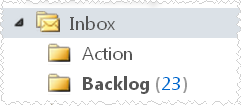
Step 2. Isolate the backlog. All emails received prior to today go in the backlog folder. (Notice that I have 23 to get through -could be much worse!)
Step 3. Now your inbox contains today’s incoming mail. At the end of the day, deal with it. You can:
- Do it. Act if it’s short or urgent enough.
- Delete it. If it’s irrelevant.
- Defer it. Put it in the action folder for tomorrow.
You now have an empty inbox.
How good does that feel?!
From now on, your inbox only contains today’s incoming mail. Check messages if you want, but leave them in your inbox. At the end of the day is the time to deal with them.
This is time efficient -- you deal with a finite number of emails, rather than reacting to those that grab you attention. Your emails don’t control you. You now control them.
The next time to check your emails is tomorrow morning. Why? Well, you need to check today’s messages periodically for anything that is urgent. Most stuff isn’t, though.
So, you now have three folders:
- Inbox - today’s mail.
- Backlog - everything before today.
- Action - for tomorrow (if you’re at the end of the day).
Every day, you’ll need to manage your email folders.
Tip: Write all your action emails on your daily task list
An example...
Tuesday. Sarah has been away for a few days and her inbox has 403 messages. Ouch!
What does she do?
- Sarah puts all messages received up to Monday evening in a backlog folder.
- She deals with Tuesday’s mail at the end of the day. Some things she deletes, others she responds to. The rest she puts in her action folder for tomorrow.
Wednesday. Sarah has three folders to manage today:
- The backlog folder – she chips away at this in the morning.
- Her action folder – Sarah aims to do something about all of these.
- Her inbox – as for Tuesday.
Sarah’s backlog folder will shrink until it can be removed. She will then only have two folders to manage: ‘inbox’ and ‘action’.
Take it further...
You can easily increase the flexibility of this system.
Instead of one ‘Action’ folder, create folders for every working day of your week, plus one called ‘Future’ for anything that requires action more than a week away.
So, for example, rather than moving an email from ‘Inbox’ to ‘Action’, you move it to the folder for the following day of the week. This has the added advantage of allowing you to shunt emails into folders for action on specific days.
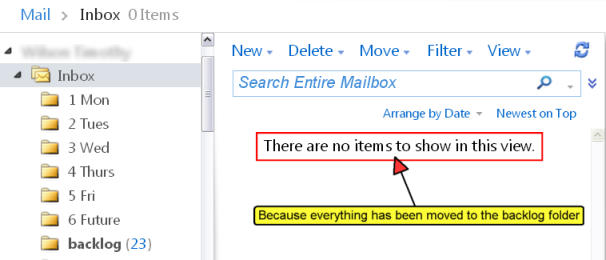
Maintaining an empty inbox
During the course of a typical work day, how many emails do you get? One day’s worth is all you should work on.
Use this system -- you'll leave work daily with your inbox empty, your mind calm... and your head clear.
Do you need to get a better balance in your life?
Click below to check out the
Time Management Success
e-book!

- Home ›
- How to Use Email ›
- Empty Inbox