
The Tickler File Explained
A quick and easy guide to this brilliant system
A tickler file is a filing system that makes it easy for you to get hold of whatever you need, whenever you need it.
Typically it is organized into 43 sections:
- 12 for each month of the year.
- 31 for each day of any given month.
This system allows you to organize, access and act on time sensitive documents at the time that you decide is most appropriate.
Of course, when I say time sensitive, I'm referring to anything you decide to do on a particular day, regardless of whether it needs to be done that day or not.
Examples
Use it at home and at work to store and retrieve…
- concert tickets
- hotel reservations
- meeting minutes
- birthday cards
- reminders
- unpaid invoices
… and so on, as and when you want to.
How to Use It
Each day - ideally at the same time so that you make it a habit - check the contents of the folder for that day and act on each one as required.
It works particularly well if you do all your tasks in one burst, but you certainly don't have to do it that way.
During the day collect anything that you decide to put your system and either do so then or, if you have several things to add, batch them together in a daily folder (call it ‘Today’s Ticklers’?!) and file them all in one go at the end of the day.
Types
- Paper based. This can be created to suit however you process your tasks best. Filing cabinets, index cards or ring binder folders can be used.
- Computer based. Particularly useful for organizing emails. Create folders for days and months, then put time sensitive information in the appropriate folder. I do this myself and it works really well.
Variations
Adapt your filing system to suit your circumstances.
For example you could have something simple such as daily folders for each working day of the week and a ‘future’ folder that you check on Friday:
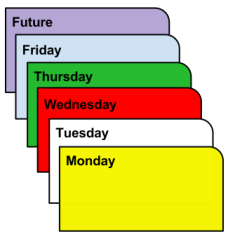
(I use this one myself, both for physical files and for all incoming emails.)
Alternatively, create folders for each working day of the month plus the 12 monthly folders.
The tickler system only works if you use it daily, so make it as easy to get to and to use as possible.
Do you need to get a better balance in your life?
Click below to check out the
Time Management Success
e-book!

- Home ›
- How to Get Organized ›
- Tickler File